You can do some pretty cool things with tesseract-ocr. Using PyOCR, which is a wrapper for Tesseract, you can generate text from an image using Tesseract.
Example Image:

Example Output:
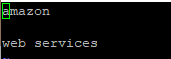
Example Code:
from wand.image import Image
from PIL import Image as PI
import pyocr
import pyocr.builders
import io
import sys

reload(sys)
sys.setdefaultencoding('utf8')

tool = pyocr.get_available_tools()[0]
lang = tool.get_available_languages()[1]

txt_list = tool.image_to_string(
 PI.open('/home/build/aws.jpg'),
 lang=lang,
 builder=pyocr.builders.TextBuilder())

outputFile = open('output.txt', 'w')
for item in txt_list:
 outputFile.write("%s" % item)
outputFile.close()
Another use case I was working on today was rendering the text in a PDF file using Tesseract. I was converting the PDF to an image file first, then performing the above actions to read the text from the new image.
Here are a couple valuable resources I used to complete this little test.
- Installing Tesseract on a RHEL system – http://www.keienberg.com/install-tesseract-3-04-centos-7/ (link)
- Installing PyOCR and other image conversion tools – https://pythontips.com/2016/02/25/ocr-on-pdf-files-using-python/ (link)
Getting all the prerequisites installed was by far the hardest part on this effort.
 DevOps Unleashed