I recently started using Slack more, specifically with custom notifications sent from outside Slack to my Slack channel.
There are many different ways to do this. For this blog post, I will show you how I setup message sending with PowerShell.
PowerShell (Super Easy!)
- Use the PSSlack module to make things easy.
- Install this module on your server\workstation.
- Obtain your legacy token from here for your Slack instance.
- Setup your VS PowerShell project. (Unreliable VS 2015 PS add-in)
- Write some easy code and have a tool like Jenkins run the program as needed!
- Note, you will need to set the Token variable yourself.
- You can select your message emoji from this list.
New-SlackMessageAttachment -Color $_PSSlackColorMap.green `
 -Title 'The Flask Build Deployment Passed' `
 -TitleLink https://www.devopsunleashed.com `
 -Text 'Great job!' `
 -Pretext 'Build Deployment Alert' `
 -AuthorName 'DevOpsUnleashed' `
 -AuthorIcon 'IMAGE_PATH_HERE' `
 -Fallback 'Your client is bad' |
New-SlackMessage -Channel '#build-results-flask' -Username "Build Notifier" `
 -IconEmoji :checkered_flag: |
Send-SlackMessage -Token $Token
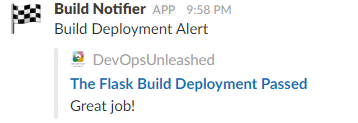
You should get a nice message to your Slack channel!
One of my main attributes of a good DevOps team is collaboration, the other being automation. Slack is a great tool to assist in improving collaboration, and even allows for some cool automation!

 DevOps Unleashed