This blog post is a continuation of my Google Home\Google Action side project. The first blog post is here.
The project keeps evolving the more I think about it. The 2 diagrams below illustrate the workflows that need to be developed.
Populate the Database – Workflow 1

Google Home\Google Action – Workflow 2

So as you can see above, a critical piece of this puzzle is the REST API that needs to be created to allow us to interact with the data.
For the REST API, I have decided to use Python, Flask, and Flask-RESTful. For this service I can host the API instance on Heroku if needed. As for which database to use, I am thinking MongoDB, and if needed host it online with mLab. Tools I will use to help get this API created are Postman, Curl, and PyCharm. (Great resource)
First – Lets stub out the RestAPI code and the HTTP method “flask-restful” classes using PyCharm.
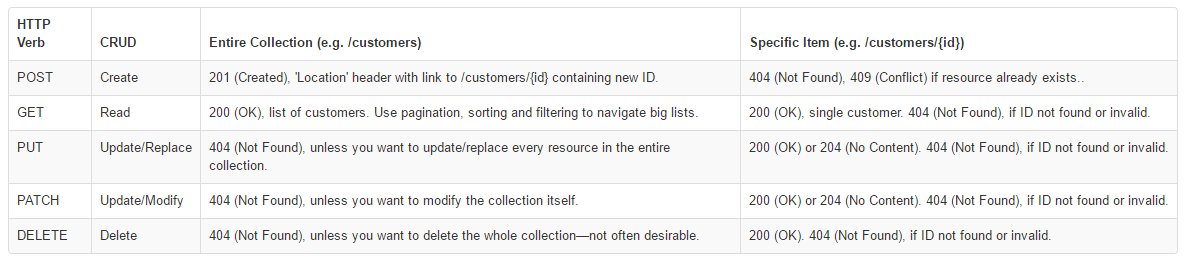
Below is a “rough” first draft of the python REST API.
from flask import Flask
from flask_restful import reqparse, abort, Api, Resource

app = Flask(__name__)
api = Api(app)

# Sample lunch menu data for testing
LUNCHMENU = {
    '4202017': {'menu': 'Main entry is corn dogs'},
    '4212017': {'menu': 'Main entry is chicken nuggets'},
    '4222017': {'menu': 'Main entry is tacos'},
}

# Argument parser - must add all arguments explicitly here
parser = reqparse.RequestParser()
parser.add_argument('item')
parser.add_argument('date')

# Check if item exists and error if it doesn't
def error_if_item_doesnt_exist(id):
    if id not in LUNCHMENU:
        abort(404, message="Menu Item {} doesn't exist".format(id))

# Check if item exists and error if it does
def error_if_item_does_exist(id):
    if id in LUNCHMENU:
        abort(404, message="Menu Item {} exist".format(id))


# Define get, delete, and put method class
class MenuItem(Resource):
    def get(self, id):
        error_if_item_doesnt_exist(id)
        return LUNCHMENU[id]

    def delete(self, id):
        error_if_item_doesnt_exist(id)
        del LUNCHMENU[id]
        return '', 204

    def put(self, id):
        args = parser.parse_args()
        LUNCHMENU[id] = {'item': args['item']}
        return LUNCHMENU[id], 201


# Define list and post method class
class MenuList(Resource):
    def get(self):
        return LUNCHMENU

    def post(self):
        args = parser.parse_args()
        error_if_item_does_exist(args['date'])
        LUNCHMENU[args['date']] = {'item': args['item']}
        return LUNCHMENU[args['date']], 201


# Setup Api resource routing to classes here
api.add_resource(MenuList, '/menuitems')
api.add_resource(MenuItem, '/menuitems/<id>')

# If program is executed itself, then run
if __name__ == '__main__':
    app.run(debug=True)
Next step will be to true up the code to accept\parse the incoming JSON and then send the correct JSON format back to the API.AI agent.
- Request format – https://docs.api.ai/docs/webhook#section-format-of-request-to-the-service
- Response format – https://docs.api.ai/docs/webhook#section-format-of-response-from-the-service


3 responses to “Python, Flask, and Rest API”
Thanks for the demonstration on how to use REST API and Python. API’s are clearly becoming a huge trend in the programming world!!!
LikeLike
[…] continuing to develop the REST API that will be used with the API.AI Webhook. I decided that some sort of authentication is […]
LikeLike
[…] Chalice is a Python package with syntax similar to Flask. […]
LikeLike